Local-first · macOS On-device Ivy Star on GitHub

Meeting notes with Ivy — and you decide where it runs.

IndexOne records your calls and transcribes them on your Mac. Ask Ivy live, mid-meeting, and across everything you have recorded. Run AI locally, or explicitly opt into redacted cloud AI — your meeting archive stays on your Mac.

Signed and notarized · macOS 13.4+ · Apple Silicon and Intel · your notes stay Markdown you own

  • On-device transcription
  • Touch ID lock at rest
  • No cloud required
  • Plain Markdown you own
Only in IndexOne

What no other notes app does for your meetings.

Plenty of apps store notes or transcribe calls. IndexOne records both sides of the call on your Mac, lets you ask Ivy during the meeting, and proves every line it writes.

  • Ask Ivy mid-meeting — and keep it on your Mac

    Type or say a question mid-call and get an answer grounded in every meeting you have recorded, with sources you can open — the recording never pauses. Run Ivy on-device or through a local Ollama and no meeting text leaves your Mac; cloud AI stays off until you consent once.

    How Ivy works
  • Both sides of the call, transcribed on your Mac

    Your mic and the other participants' system audio are captured as two streams and merged into a Me / Others transcript by on-device Whisper. There is no cloud transcription.

    Capture and transcription
  • Every claim has a receipt

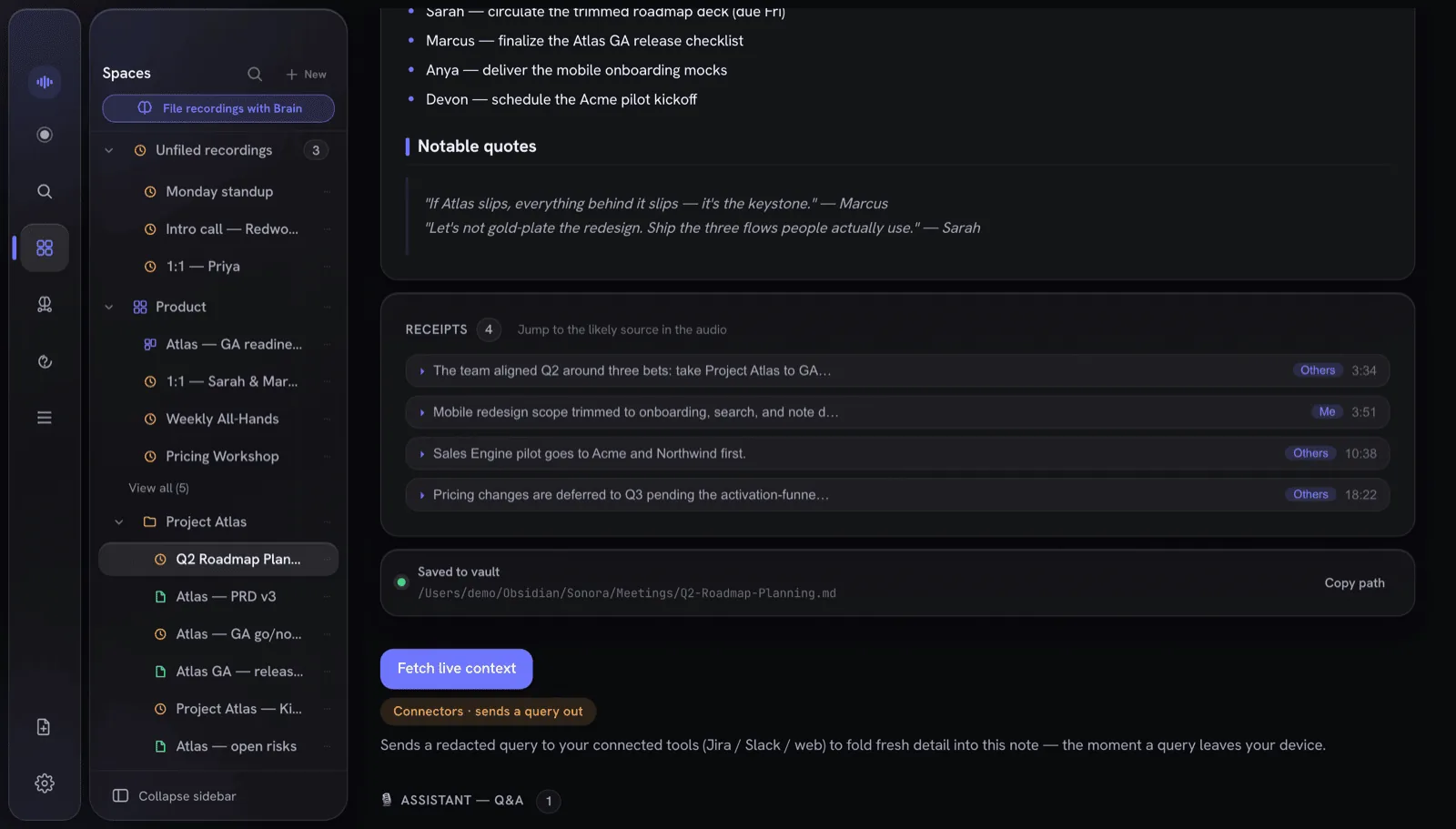
    Each grounded line in a note links to the second of audio it came from, with the speaker and confidence. Lines without evidence get no receipt, so you see what is verified.

    Receipts
  • Encrypted wherever it is stored

    Your whole library is SQLCipher-encrypted on the Mac. Anything you share is sealed with AES-256-GCM before upload, so the server only ever holds ciphertext — and sign-in uses OPAQUE, so it never learns your password.

    Security and privacy
  • Folders sealed with Touch ID

    Lock a Workspace or folder and its notes, transcripts and audio are sealed with AES-256-GCM. While locked it is invisible to search, the graph, MCP and the audio player.

    The lock model
  • Plain Markdown and a local MCP server

    Notes land in your Obsidian vault as plain Markdown with wikilinks, and a read-only MCP server on 127.0.0.1 lets Claude and other agents query them.

    Markdown and MCP
Ivy

Talk to Ivy — during the meeting.

This is the part most note-takers don't have. Trigger Ivy with a wake phrase or a single tap; it answers out of your meeting memory, live, with citations you can open — and the recording never stops.

  • On-device reasoner (Bielik-11B, Qwen) via Metal
  • Grounded, not hallucinated — retrieved from your own transcripts
  • Optional consent-gated web — off by default
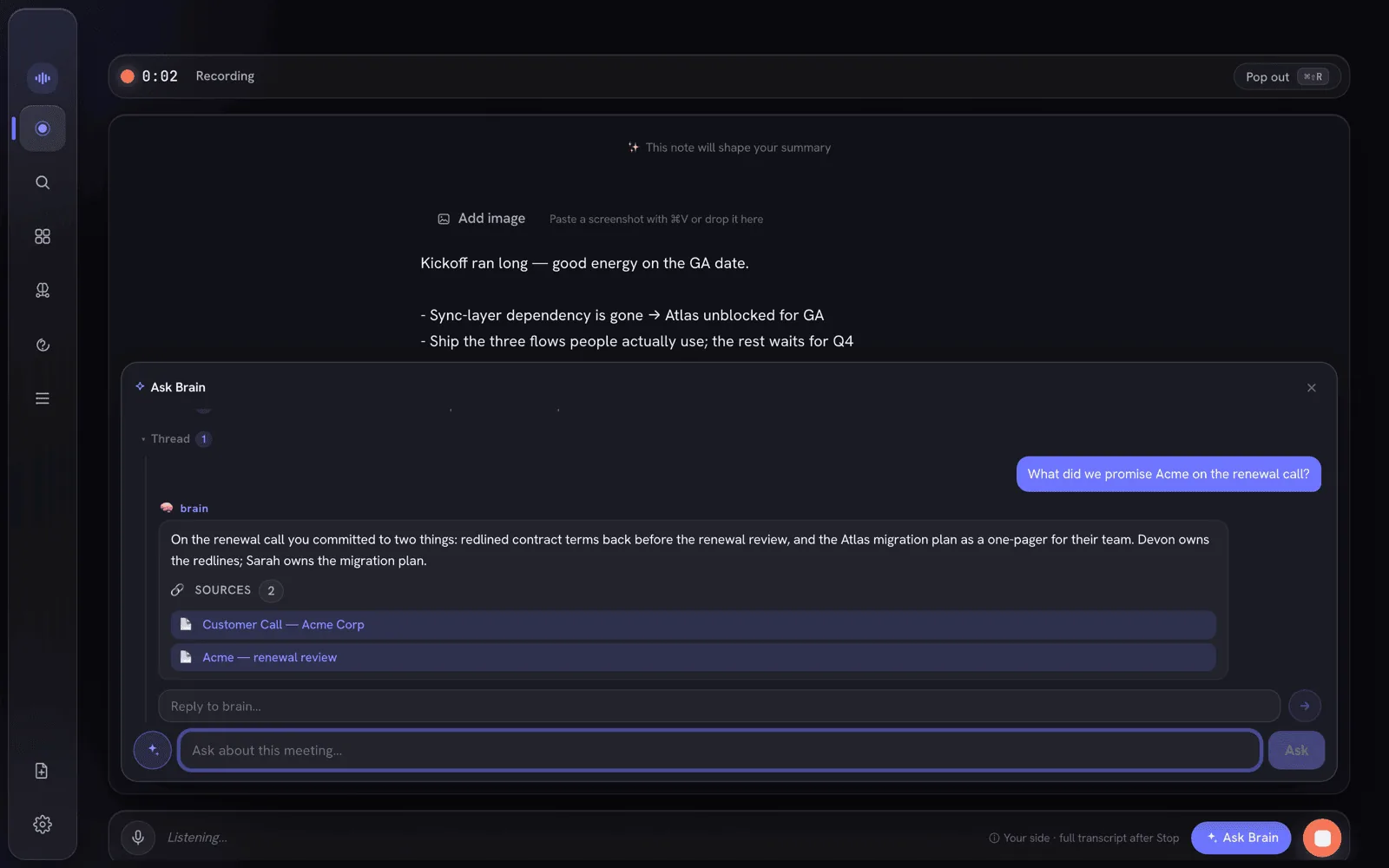
A recording in progress with a question asked mid-meeting, answered live by Ivy with the sources it drew on
Receipts

Every claim traces back to the tape.

IndexOne's notes don't ask you to trust them. Each line that's grounded in what was actually said carries a receipt — click it to jump straight to that second of audio, with the speaker and confidence. Paraphrased or unsupported lines get none, so you can see at a glance what's verified.

  • Click a claim, hear exactly where it came from
  • Speaker and ASR confidence on every receipt
  • Seven one-click artifacts from any meeting — follow-up email, decision log, work ticket, 1:1 recap, standup, sales recap, interview notes
  • Sealed folders leak no timing or speaker, ever
A generated note's receipts: one row per grounded claim, each carrying the speaker and the second of audio it came from

See every feature

How it works

Record → understand → ask. Local-first by design.

One local-first pipeline turns a live call into searchable memory. Transcription stays on your Mac; Ivy can run locally or, with explicit consent, use redacted cloud processing.

  1. 01 · Record

    Hears the whole call

    Your mic and the other side's system audio, captured and transcribed separately, then merged into a clean Me / Others transcript by on-device Whisper.

  2. 02 · Understand

    Ivy, on your Mac

    A reasoning model runs locally over a semantic index of everything you've recorded — writing a structured note and keeping the memory searchable forever.

  3. 03 · Ask

    Answers, live and cited

    Ask Ivy mid-meeting and get a grounded answer with sources — or ask across months of calls afterwards. The recording never stops.

Bring Ivy to your meetings — keep control on your Mac.

Local-first for macOS. Keep AI local, or explicitly opt into redacted cloud AI when you choose. See how it compares with Obsidian, Notion, Evernote, Bear and Amie.

Running version 2.8.0 or earlier? Its update check can no longer reach us. Download the latest release once and drag it into Applications, replacing the old copy; your library, recordings and settings stay where they are. From 2.9.0 on, the app finds new versions by itself.